
Download PrintKey Pro – Free Screen Capture Tool for Windows & Mac
PrintKey Pro is a powerful, user-friendly screen capture software designed for anyone who needs to quickly and securely save images from their computer screen. Whether you're documenting a software bug, capturing a game moment, creating tutorials, or saving important business information, PrintKey Pro makes it easy. With customizable hotkeys, instant capture, and built-in editing tools, this tool streamlines your workflow. The software supports both Windows and Mac operating systems, including Windows 7 through 11 and Mac OS X 10.12 or later. Download the free trial today and experience fast, reliable screen capture with full editing capabilities.
Why PrintKey Pro Stands Out Among Screen Capture Tools
In today’s digital world, the ability to capture and share screen content is essential. PrintKey Pro rises above the competition by combining speed, simplicity, and powerful features into a single lightweight application. Unlike many screen capture tools that require complex workflows or third-party integrations, PrintKey Pro delivers everything you need in one seamless package. The moment you install it, you can assign a custom hotkey—whether it’s Ctrl+Shift+S or F12—to instantly capture your screen with a single keystroke. This level of customization is perfect for power users who work across multiple applications and need instant access to screen capture without interrupting their workflow. One of the standout features is its real-time capture capability. Whether you're in a video call, gaming, or navigating a complex business dashboard, PrintKey Pro captures exactly what’s on screen at that moment. The tool supports full-screen, window-specific, and region-based captures, giving you complete control over what gets saved. After capture, you’re not left with a raw image—PrintKey Pro includes a built-in editor that allows you to adjust brightness, contrast, and saturation, or convert images to grayscale and black and white for a professional look. You can even add text overlays, which is ideal for annotating tutorials or highlighting important data points. Another major advantage is its compatibility. PrintKey Pro runs smoothly on Windows 7, 8, 10, and 11, as well as Mac OS X 10.12 and later. This broad support ensures that whether you're using a legacy machine or a modern MacBook, you can take full advantage of its features. The software is lightweight, consuming minimal system resources, so it won’t slow down your device. With secure file handling and no intrusive ads in the free trial, PrintKey Pro offers a clean, focused experience. For professionals, students, and casual users alike, this tool is a must-have for quick, reliable screen capture.Powerful Features and Built-in Editing Tools
PrintKey Pro isn’t just about capturing screens—it’s about enhancing and sharing them efficiently. Once you’ve taken a screenshot, the built-in editor transforms it into a polished visual asset. You can adjust image quality with intuitive sliders for brightness, contrast, and sharpness, ensuring your captures are always clear and professional. Want to give your image a vintage feel? Use the greyscale or black-and-white filters to create a dramatic effect. These tools are especially useful for content creators, educators, and marketers who need to produce visually appealing materials. The software supports a wide range of output formats, including JPG, JPEG, BMP, PNG, GIF, TIF, and PCX. This versatility means you can save your images for web use, print, presentations, or archival purposes without needing additional conversion tools. PNG is ideal for transparent backgrounds, while GIFs allow for simple animations—perfect for creating short tutorial clips. The ability to export in multiple formats eliminates the need for third-party software, saving time and reducing clutter. Other notable features include automatic file naming, customizable save locations, and the option to copy screenshots directly to the clipboard. You can also set a default capture key that works across all applications, so you never have to switch contexts. For teams, this means consistent documentation and faster knowledge sharing. PrintKey Pro also includes a simple history panel that stores recent captures, making it easy to revisit and re-edit images without searching through folders. For users who value privacy, the software operates offline and does not upload screenshots to any cloud service unless explicitly configured. This makes it a secure choice for capturing sensitive business or personal data. Whether you're troubleshooting software, creating user guides, or saving a memorable game moment, PrintKey Pro gives you full control over your screen content.How to Install and Use PrintKey Pro on Windows & Mac
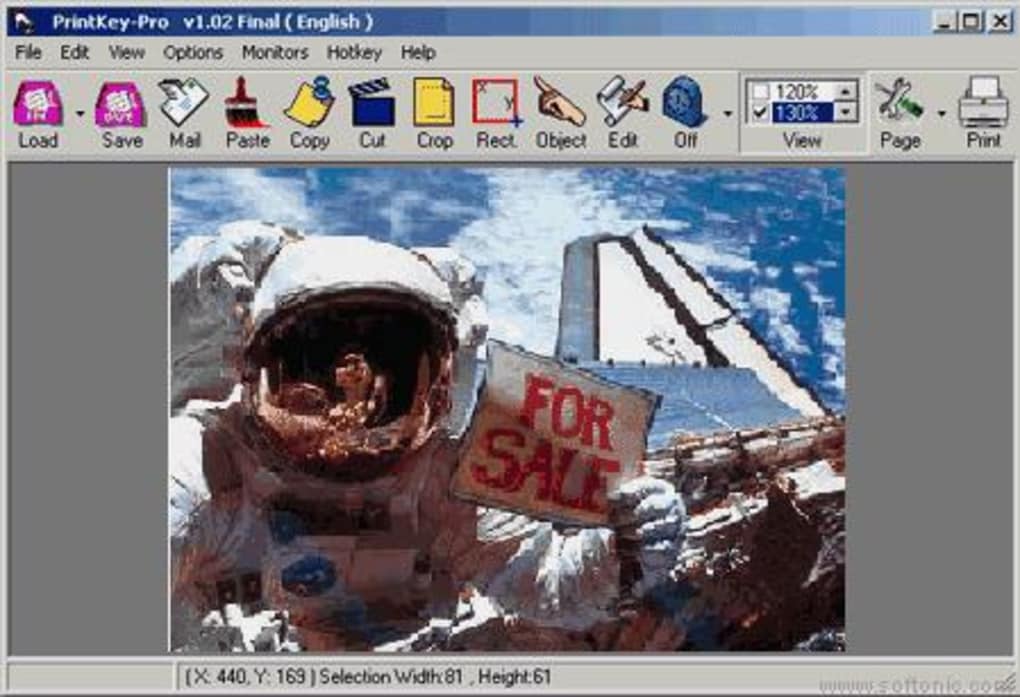
Getting started with PrintKey Pro is quick and straightforward. Begin by downloading the software from the official website. The installer is lightweight and installs in under a minute. On Windows, simply run the .exe file and follow the on-screen prompts. On Mac, open the .dmg file and drag the app into your Applications folder. Once installed, launch the program to access the main interface. Upon first launch, you’ll be prompted to set your preferred capture hotkey. Choose a key combination that’s easy to remember and won’t conflict with existing shortcuts in your favorite applications. You can also customize the default save location—whether it’s your Documents folder, Desktop, or a dedicated Screenshots folder. The software automatically creates a timestamped filename, but you can override this with a custom name if needed. To take a screenshot, press your assigned hotkey. The screen will briefly dim, confirming the capture, and the image will be saved to your chosen folder. If you want to capture a specific region, press the hotkey while holding down the Shift key (or use the on-screen selection tool). For full-screen captures, just press the hotkey once. After capture, you can instantly edit the image using the built-in editor. The editing interface is clean and intuitive. Use the toolbar to adjust brightness, contrast, and color balance. Add text captions by clicking the “Text” tool and typing your message. You can change font, size, and color to match your branding or style. Once satisfied, click “Save” and choose your preferred format. The entire process—from capture to export—takes less than 30 seconds. PrintKey Pro also supports automatic updates. When a new version is available, you’ll receive a notification, ensuring you always have the latest features and security patches. The free trial version includes full functionality, so you can test all features before purchasing the full license.Pros and Cons: Is PrintKey Pro Right for You?
- Pros:
- Lightweight and fast performance on both Windows and Mac
- Customizable hotkeys for instant screen capture
- Powerful built-in image editor with brightness, contrast, and filter options
- Supports multiple formats: JPG, PNG, BMP, GIF, TIF, PCX
- Secure, offline operation with no data uploads
- Free trial with full feature access
- Compatible with Windows 7–11 and Mac OS X 10.12+
- Cons:
- No built-in screen recording feature (only still images)
- Basic editing tools—advanced photo editing requires external software
- Minimal interface customization options
- Free trial does not include cloud sync or sharing features
Frequently Asked Questions (FAQ)
Can I use PrintKey Pro on both Windows and Mac?
Yes, PrintKey Pro is compatible with Windows 7, 8, 10, and 11, as well as Mac OS X 10.12 and later. The software is available for both platforms, ensuring a consistent experience regardless of your device.
Is PrintKey Pro free to download and use?
Yes, you can download and use PrintKey Pro for free. The free trial offers full access to all features, allowing you to test the software before purchasing the full license.
Can I edit screenshots after capturing them?
Absolutely. PrintKey Pro includes a built-in editor with tools for adjusting brightness, contrast, and color. You can also convert images to greyscale or black and white, add text captions, and save in multiple formats.
Does PrintKey Pro support region-based captures?
Yes, you can capture specific regions of your screen by selecting the area with your mouse after pressing the hotkey. This is ideal for focusing on a particular window or section without including unnecessary background.
How do I update PrintKey Pro?
PrintKey Pro automatically checks for updates when launched. If a new version is available, you’ll receive a notification. Simply click to download and install the latest update to keep your software secure and up to date.







